SSL Certificate Validation Settings
TL;DR. Configure whether PanDev Metrics strictly validates SSL/TLS certificates when connecting to external and internal services (Git providers, task trackers, webhooks, and mail servers). Disabling verification is useful for On-Premise environments utilizing self-signed certificates. Audience: tenant administrator.
Before you begin
- Admin access (Owner or Maintainer) to your PanDev Metrics tenant
- Understanding of your organization's network topology and certificate infrastructure (public CA vs. internal self-signed CA)
:::note Security Consideration We recommend keeping SSL certificate validation enabled whenever possible. Disabling SSL verification should only be done for isolated test environments or secure private subnets. :::
Step 1 — Open the SSL Settings page
- Open your PanDev Metrics workspace.
- In the left navigation sidebar, navigate to Settings (or Organization Settings).
- Under the settings menu, select the SSL tab.
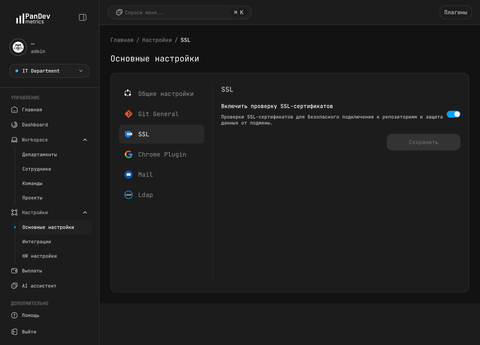
Step 2 — Configure SSL Validation
| Option | Default | Description |
|---|---|---|
| Enable SSL certificate validation | Enabled | When enabled, PanDev Metrics validates the entire certificate chain against trusted Certificate Authorities for every outgoing connection. When disabled, TLS connections accept self-signed or expired certificates. |
- Enable validation (Recommended for Production): Ensures encrypted transport and verifies that servers you connect to (e.g. GitHub, GitLab, Jira) are genuine and not compromised by Man-In-The-Middle (MITM) attacks.
- Disable validation (For Self-Signed On-Prem): Necessary if your internal Git or task tracker instances use private, self-signed certificates that are not imported into the system truststore.
Step 3 — Save Changes
- Toggle the switch to your desired state (Enabled or Disabled).
- Click Save at the bottom of the form.
- The change takes effect immediately for all subsequent background syncs and API requests — no server restart required.
Troubleshooting
Integration fails with "x509: certificate signed by unknown authority" or "UNABLE_TO_VERIFY_LEAF_SIGNATURE"
This error occurs when the remote service uses a private or self-signed certificate. You can resolve this in two ways:
- Disable SSL verification in Settings → SSL.
- Alternatively, import your organization's root CA certificate into the PanDev Metrics host system truststore.
Does this setting affect browser extensions or IDE plugins?
The Settings → SSL setting applies to server-side outgoing connections (PanDev Metrics server connecting to Git/Jira/LDAP). For client-side IDE plugins and browser extensions, SSL settings are configured independently within the respective plugin preferences.
FAQ
Does disabling SSL validation disable HTTPS encryption?
No. Traffic is still transmitted encrypted over HTTPS/TLS; only the certificate authority and hostname validation checks are bypassed.
Which integrations are affected by this setting?
All outbound HTTP/HTTPS integrations configured in the workspace, including GitLab, GitHub Enterprise Server, Jira Server/Data Center, Bitbucket Server, YouTrack, and custom Webhooks.