ClickUp Integration with PanDev Metrics
TL;DR. To connect ClickUp you need two values: a Personal API Token and your Team ID. Generate the token in ClickUp, copy the Team ID from the address bar, and paste both into Settings → Integrations → ClickUp. Audience: admin.
Before you begin
- PanDev Metrics is up and running (Cloud workspace or on-prem instance)
- Admin access to your PanDev Metrics tenant
- A ClickUp account with access to the workspace you want to track
Step 1 — Create a Personal API Token
- Sign in to ClickUp.
- Click your avatar in the top-right corner → Settings.
- In the left menu, open Apps.
- Under API Token, click Generate.
- Copy the token — it starts with
pk_….
:::warning Keep the token private The Personal API Token grants the same access as your ClickUp account. Store it in a secrets manager. :::
Step 2 — Get your Team ID
Your ClickUp Team ID is the number in the address bar right after the domain:
https://app.clickup.com/{teamId}
Open ClickUp in a browser and copy the number that follows https://app.clickup.com/.
Step 3 — Connect ClickUp in PanDev Metrics
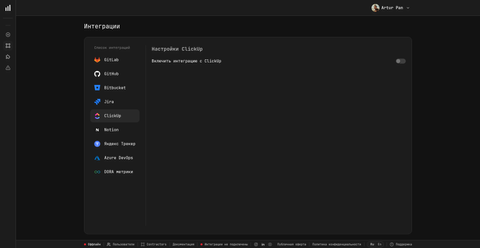
- Open PanDev Metrics and go to Settings → Integrations → ClickUp.
- Fill in the form:
| Field | Value |
|---|---|
| API Token | The pk_… value from Step 1 |
| Team ID | The number from Step 2 |
- Save the integration.
Verify
Open a dashboard with a task-tracker widget and confirm that ClickUp tasks appear next to commits and their statuses match ClickUp.
To link a commit or pull request to a ClickUp task, put the task ID with the CU- prefix in the branch name, commit message, or PR title — for example feature/CU-abc1d2 - description.
Troubleshooting
Connection fails with "401 Unauthorized"
The API token is wrong or was regenerated. Open ClickUp → Settings → Apps, generate a fresh token, and paste it into PanDev Metrics.
No tasks appear
The Team ID is wrong. Reopen ClickUp in a browser and copy the number right after https://app.clickup.com/.
Next steps
- Install the JetBrains plugin — capture IDE time per ClickUp task
- Install the VS Code plugin — same for VS Code, Cursor, and Windsurf
- Connect GitHub — join commits and pull requests with ClickUp tasks
Related
- How-to: Jira integration
- How-to: Yandex Tracker integration
- How-to: Notion integration
- How-to: Azure Boards integration